Lesson 21: Synchronization
So, we’re rendering our triangle now and that’s great. However, we get a constant flow of two different validation errors. This is probably not so good, let’s try to fix them.
The first error looks something like that:
> ... Calling vkBeginCommandBuffer() on active VkCommandBuffer 0x1de3f331090[] before it has completed ...The validation complains that we are trying to begin recording a command buffer which is in use. And that is true: while we said we only ever want two buffers to be ‘in flight’ at the same time, we’re not actually enforcing that anywhere yet. Rendering one simple triangle is so fast that it outpaces the presentation easily, so eventually we are indeed calling vk::CommandBuffer::begin on a buffer that is still being executed for a previous image.
So we need to make sure that the buffer is not in use anymore before recording into it. We’re going to learn how to properly do that later in this lesson. For now I want to implement a temporary fix that gets us rid of the error so we can make progress.
...while ( !glfwWindowShouldClose( window.get() ) ){    glfwPollEvents();
    logicalDevice->waitIdle();    ...}...
We’ve already used vk::Device::waitIdle in lesson 11. This is a very blunt tool and it costs a lot of performance because now host and GPU work sequentially instead of in parallel (effectively limiting the number of frames ‘in flight’ to 1). But it does the job: the validation errors about the command buffer being in use are gone. As said, we’re going to implement a better solution later in this lesson.
Let’s look at the remaining errors now:
> ... vkAcquireNextImageKHR: Semaphore must not be currently signaled or in a wait state ...Alright, I think it’s time to finally talk about semaphores and fences now.
Semaphores and Fences
Section titled “Semaphores and Fences”Both, semaphores and fences, are synchronization primitives1. This is not a tutorial about asynchronous programming or multithreading, so I’m not going to go into too much detail here. Suffice it to say that if multiple tasks on a computer run in parallel, there are situations where you want to be sure that one or more of them have reached a certain state before you start doing something in the scope of another. This is e.g. always the case if you want to transfer data from one thread to another.
Conceptually, semaphores and fences work very similar. Both can be in one of two states: unsignaled or signaled. Vulkan functions that make use of them are designed so that execution of the respective task halts at unsignaled semaphores/fences and only resumes when they become signaled.
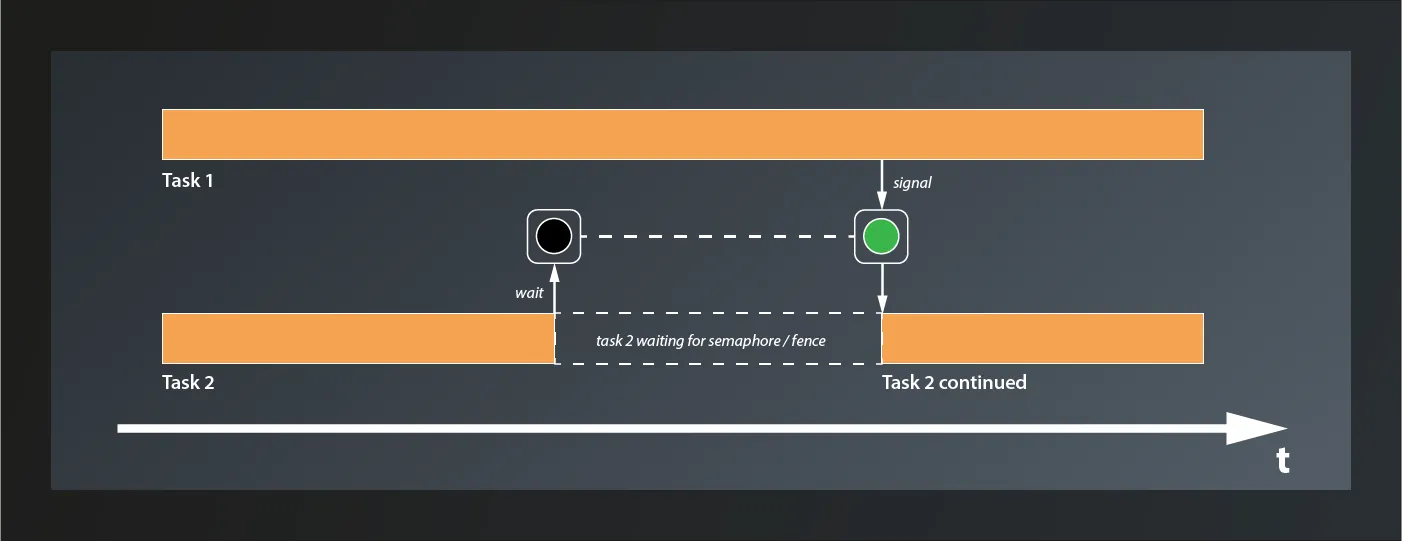
The difference between semaphores and fences is that the former are used to synchronize internal operations on the GPU and you have no way to explicitly signal/unsignal them from your application code. Instead you pass them to Vulkan functions such as e.g. Queue::submit and let the implementation take care of that. Fences on the other hand are designed to synchronize the execution flow between the host application and the GPU. You can explicitly wait for a Fence to be set (signaled) by the GPU and then reset it (put them back to the unsignaled state). You cannot signal them actively though, that’s the privilege of the GPU.
Using Semaphores
Section titled “Using Semaphores”So what does that now mean in practice? We’ve already created a semaphore, although we did not really understand it or look at the create info structure in detail back then. As it turns out we didn’t miss too much there:
struct SemaphoreCreateInfo{ ... SemaphoreCreateInfo& setFlags( SemaphoreCreateFlags flags_ ); ...};So the only parameter we could set are the flags_, but even that one is only reserved for future use. Nothing more for us to do here.
The validation error complains that the semaphore passed to vkAcquireNextImageKHR is ‘signaled or in a wait state’. Let’s see: acquireNextImageKHR is the first function we pass our semaphore to. Since semaphores are created in an unsignaled state this cannot be the problem, at least not in the first iteration.
According to the documentation, the semaphore passed to acquireNextImageKHR will be signaled when the image is ready to be rendered to. That may sound strange at first, intuitively we might expect the image to be ready immediately when the function call completes. However, to allow maximum throughput acquireNextImageKHR returns the index of the next image even if the presentation engine is still using that image. This enables the host application to use the index already and prepare the rendering of the next frame. When the image is finally available, rendering can start right away.
So we have a signaled semaphore now, but take a look at our code: we’re not actually doing anything with it. That explains the error: after the first call to acquireNextImageKHR, the semaphore remains signaled forever. Effectively we’re not using the semaphore at all. We need to change that, so let’s see where we need it.
The next thing we do after acquiring the image is to record the command buffer. This is safe: we don’t actually render anything here, so the image is not used yet and there’s no problem if it’s still being presented. What is not safe anymore is to submit the command buffer. Once that happens the GPU can start rendering to the image at any time, so here we need to make sure that our image is actually ready. This is where two members of SubmitInfo come into play that I’ve glossed over back in lesson 11: setWaitSemaphores and setWaitDstStageMask:
- the GPU will wait for the semaphores that are passed to
setWaitSemaphoresto be signaled before continuing execution of this command buffer. - however, the GPU might actually be able to do some useful stuff before accessing the resources that are protected by the semaphores. So for maximum parallelization Vulkan enables you to specify exactly where in the pipeline it is supposed to wait for each semaphore. This is what
setWaitDstStageMaskis for: for each entry in this list, the GPU will wait for the corresponding semaphore to be signaled before entering the respective stage. So the containers passed tosetWaitSemaphoresandsetWaitDstStageMaskneed to be of the same size.
For us that means that we can pass our semaphore directly as a wait semaphore to the submit info. The GPU will then wait until it is signaled and automatically reset it. Since this semaphore protects the image that is used as the color attachment, the wait stage should be set to eColorAttachmentOutput:
...const vk::PipelineStageFlags waitStages[] = { vk::PipelineStageFlagBits::eColorAttachmentOutput };const auto submitInfo = vk::SubmitInfo{} .setCommandBuffers( commandBuffers[ frameInFlightIndex ] ) .setWaitSemaphores( *semaphore ) .setWaitDstStageMask( waitStages );queue.submit( submitInfo );...Cool, with that version the validation errors are gone. We’re not done yet though. You might have spotted another synchronization issue already: we currently schedule the image for presentation immediately after submitting the command buffer. How is the presentation engine supposed to know when the image is actually fully rendered and thus ready to be put on screen?
The answer is: it doesn’t know. It works for us at the moment because we render only one triangle, which is really fast. If we were to render a real scene chances are that the presentation would access an unfinished image. That’s not good. So we need a way to tell the presentation to wait until rendering the image has completed.
In the last lesson we already learned that PresentInfoKHR - just like SubmitInfo has a member setWaitSemaphores which we can use to specify a list of semaphores which will block the presentation until they all become signaled. So telling the presentation to wait would be easy if we could make the GPU signal a semaphore once it’s done with the rendering. And it turns out that there is yet another parameter in SubmitInfo that we ignored so far: setSignalSemaphores. This allows us to specify a number of semaphores that will be signaled once the command buffer(s) in this batch have completed execution. Which means the whole thing is actually pretty straightforward:
...auto readyForRenderingSemaphore = logicalDevice->createSemaphoreUnique(    vk::SemaphoreCreateInfo{});auto readyForPresentingSemaphore = logicalDevice->createSemaphoreUnique(    vk::SemaphoreCreateInfo{});...while ( !glfwWindowShouldClose( window.get() ) ){    ...    const auto imageIndex = logicalDevice->acquireNextImageKHR(        *swapchain,        std::numeric_limits< std::uint64_t >::max(),        *readyForRenderingSemaphore    ).value;    ...    const auto submitInfo = vk::SubmitInfo{}        .setCommandBuffers( commandBuffers[ frameInFlightIndex ] )        .setWaitSemaphores( *readyForRenderingSemaphore )        .setSignalSemaphores( *readyForPresentingSemaphore )        .setWaitDstStageMask( waitStages );    queue.submit( submitInfo );
    const auto presentInfo = vk::PresentInfoKHR{}        .setSwapchains( *swapchain )        .setImageIndices( imageIndex )        .setWaitSemaphores( *readyForPresentingSemaphore );    ...}...
We create another semaphore2 just as before and add it to the SubmitInfo as semaphore to signal when the command buffer has completed. We also add it to the PresentInfoKHR as semaphore to wait for. That way presenting will not happen before the command buffer is done with the respective image. I’ve renamed the semaphore we already had to make the usage of both clearer. Compile and run this version, you should see no visual change and no validation errors while the application is running (yes, you’ll see some when closing the app, we’re going to take care of those eventually).
Nice, so we have that one sorted out. However, there’s still one problem we need to address. Remember, at the moment we are only ever processing one image at a time (because of the call to waitIdle). Having only one semaphore for each purpose is fine. However, we’d like to start rendering the next image already while the previous one is still being processed on the GPU. If we were to signal and wait on the same semaphores for different images in this case, things would get very messy.
Luckily the fix is pretty straightforward: we simply use multiple semaphores instead. The naive approach would be to create one semaphore for each swapchain image. This has a problem though: we only learn about the index of the swapchain image we’re going to use when we call acquireNextImageKHR. However, we’d already need that index to pass the correct semaphores to the functions, so we’re in a chicken-egg situation here. But actually we don’t need that many semaphores anyway: we still intend to limit the number of frames in flight, so we also only need that number of semaphores.
It’s worth pausing here to note that the number of frames in flight and the number of swapchain images are two independent concepts. The swapchain image count is dictated by the presentation engine and tells us how many images we can present; the number of frames in flight is our own choice of how many frames the host is allowed to prepare before it has to wait for the GPU. To keep these apart, let’s introduce a dedicated constant:
constexpr std::uint32_t maxFramesInFlight = 2u;The command buffers, semaphores and (later) fences are then all sized to maxFramesInFlight. Let’s create and use the semaphores:
...std::vector< vk::UniqueSemaphore > readyForRenderingSemaphores;std::vector< vk::UniqueSemaphore > readyForPresentingSemaphores;for( std::uint32_t i = 0; i < maxFramesInFlight; ++i ){    readyForRenderingSemaphores.push_back( logicalDevice->createSemaphoreUnique(        vk::SemaphoreCreateInfo{}    ) );
    readyForPresentingSemaphores.push_back( logicalDevice->createSemaphoreUnique(        vk::SemaphoreCreateInfo{}    ) );}const auto queue = logicalDevice->getQueue( logicalDevice.queueFamilyIndex, 0 );
size_t frameInFlightIndex = 0;while ( !glfwWindowShouldClose( window.get() ) ){    ...    auto imageIndex = logicalDevice->acquireNextImageKHR(        *swapchain,        std::numeric_limits< std::uint64_t >::max(),        *readyForRenderingSemaphores[ frameInFlightIndex ]    ).value;
    vcpp::recordCommandBuffer(        commandBuffers[ frameInFlightIndex ],        *pipeline,        *renderPass,        *framebuffers[ imageIndex ],        swapchainExtent    );
    const vk::PipelineStageFlags waitStages[] = {        vk::PipelineStageFlagBits::eColorAttachmentOutput };    const auto submitInfo = vk::SubmitInfo{}        .setCommandBuffers( commandBuffers[ frameInFlightIndex ] )        .setWaitSemaphores( *readyForRenderingSemaphores[ frameInFlightIndex ] )        .setSignalSemaphores( *readyForPresentingSemaphores[ frameInFlightIndex ] )        .setWaitDstStageMask( waitStages );    queue.submit( submitInfo );
    const auto presentInfo = vk::PresentInfoKHR{}        .setSwapchains( *swapchain )        .setImageIndices( imageIndex )        .setWaitSemaphores( *readyForPresentingSemaphores[ frameInFlightIndex ] );    ...}
And with that we’re prepared for processing multiple framebuffers in parallel. To actually do that however we need to go back to the first validation error. As said, fixing it with waitIdle effectively limited the number of frames ‘in flight’ to one, so we’re wasting performance here. We need to find a better solution.
Using Fences
Section titled “Using Fences”The problem that the validation errors informed us about was that we were trying to use a command buffer before the GPU was done with it. In a real-world application this will probably not be a very common problem, as the rendering will likely take more time and we’ll rather have the opposite problem. But the command buffer is not the only resource for which we’ll need to ensure that we’re using it before it’s ready. The same applies e.g. to the semaphores we have introduced since. So let’s try to fix this issue.
What we need to do is to make our application wait using resources until they become available again. So the host application needs to wait for the GPU, which means the right synchronization primitive for this use case is probably a fence. So let’s create one every command buffer in flight:
...std::vector< vk::UniqueFence > inFlightFences;std::vector< vk::UniqueSemaphore > readyForRenderingSemaphores;std::vector< vk::UniqueSemaphore > readyForPresentingSemaphores;for( std::uint32_t i = 0; i < maxFramesInFlight; ++i ){ inFlightFences.push_back( logicalDevice->createFenceUnique( vk::FenceCreateInfo{}.setFlags( vk::FenceCreateFlagBits::eSignaled ) ) ); ...}...FenceCreateInfo is almost as uninteresting as SemaphoreCreateInfo. Also for this one there’s only the function setFlags. However, in contrast to the latter, there is one flag we can set: eSignaled will create a signaled fence instead of the unsignaled default. Since the fences we create here are supposed to block execution when the command buffers are not ready, we create them in the signaled state (because on first use all command buffers will be ready).
Making the application wait for a fence to be signaled is achieved by the following function:
class Device{ ... Result waitForFences( const container_t< const Fence >& fences, Bool32 waitAll, uint64_t timeout, ... ); ...}- the function takes a list of
fencesto wait for. - if
waitAllis set totrue, the function will block until all fences have been signaled, otherwise any fence becoming signaled will cause the function to return. timeoutis the number of nanoseconds the function is supposed to wait at max
Putting that into practice our code looks like this now:
...while ( !glfwWindowShouldClose( window.get() ) ){    glfwPollEvents();
    // we wait with an infinite timeout, so the result can only ever be eSuccess and    // there is no need to check it    auto result = logicalDevice->waitForFences(        *inFlightFences[ frameInFlightIndex ],        true,        std::numeric_limits< std::uint64_t >::max()    );    ...    result = queue.presentKHR( presentInfo );    ...}...
By waiting for the fence at the beginning of our render loop, we want to make sure that all the resources we used for that frame are already free again (see below).
Unfortunately, running this version yields the original validation errors again because our fences never become unsignaled and so effectively we don’t ever wait at all. At some point we need to reset them and then tell the GPU to signal them once the relevant resources become available again.
The first part is easy: once we have waited, the fence has done its duty for this cycle and we can immediately reset it:
...glfwPollEvents();
// we wait with an infinite timeout, so the result can only ever be eSuccess and// there is no need to check itauto result = logicalDevice->waitForFences(    *inFlightFences[ frameInFlightIndex ],    true,    std::numeric_limits< std::uint64_t >::max());logicalDevice->resetFences( *inFlightFences[ frameInFlightIndex ] );
auto imageIndex = logicalDevice->acquireNextImageKHR(...
But when do we signal it (or rather: when do we want the GPU to signal it)?
Well, the validation error was complaining about the command buffer being re-used before the GPU was done with it. So we definitely do want to wait for the respective command buffer in use to be processed.
Also, as said above, we have to protect our semaphores from premature re-use. Because host and GPU run asynchronously, without any synchronization we’d end up in a situation where
- the host issues the commands for frame 0 to the GPU, using the semaphores w/
frameInFlightIndex= 0. - it then does the same for
frameInFlightIndex= 1. So far, so good. - then, for the next frame, it would try
frameInFlightIndex= 0 again. However, without any fences nothing in our program guarantees that the semaphores at that index are already available again. ThereadyForPresentingSemaphoresare always used after the correspondingreadyForRenderingSemaphores, so it’s only the latter ones we need to look at here. We need to wait until the GPU is done with them before trying to re-use.
So, how do we achieve that?
Looking at our code, the last function that uses both, the readyForRenderingSemaphores and the command buffer, is the call to queue.submit. And if we look a bit closer at the signature of this function again, it actually has an optional second parameter that seems to fit our purpose:
class Queue{ ... void submit( const container_t< SubmitInfo >& submits, Fence fence, ... ); ...};So we can pass a fence that will be signaled when all the submits have been completed by the queue. Which means that with
... queue.submit( submitInfo, *inFlightFences[ frameInFlightIndex ] );...… the render loop will signal the fence when the queue is done with the command buffer and the corresponding readyForRenderingSemaphore. Exactly what we need, hooray!
Compile and run this version, all should work as before and without any validation errors while running.
Phew! This has been a lot and it’s easy to get lost in all that synchronization, so let’s quickly recap how our rendering loop is synchronized now by looking at an example (for simplicity’s sake, I’m assuming that the actual number of swapchain images equals maxFramesInFlight):
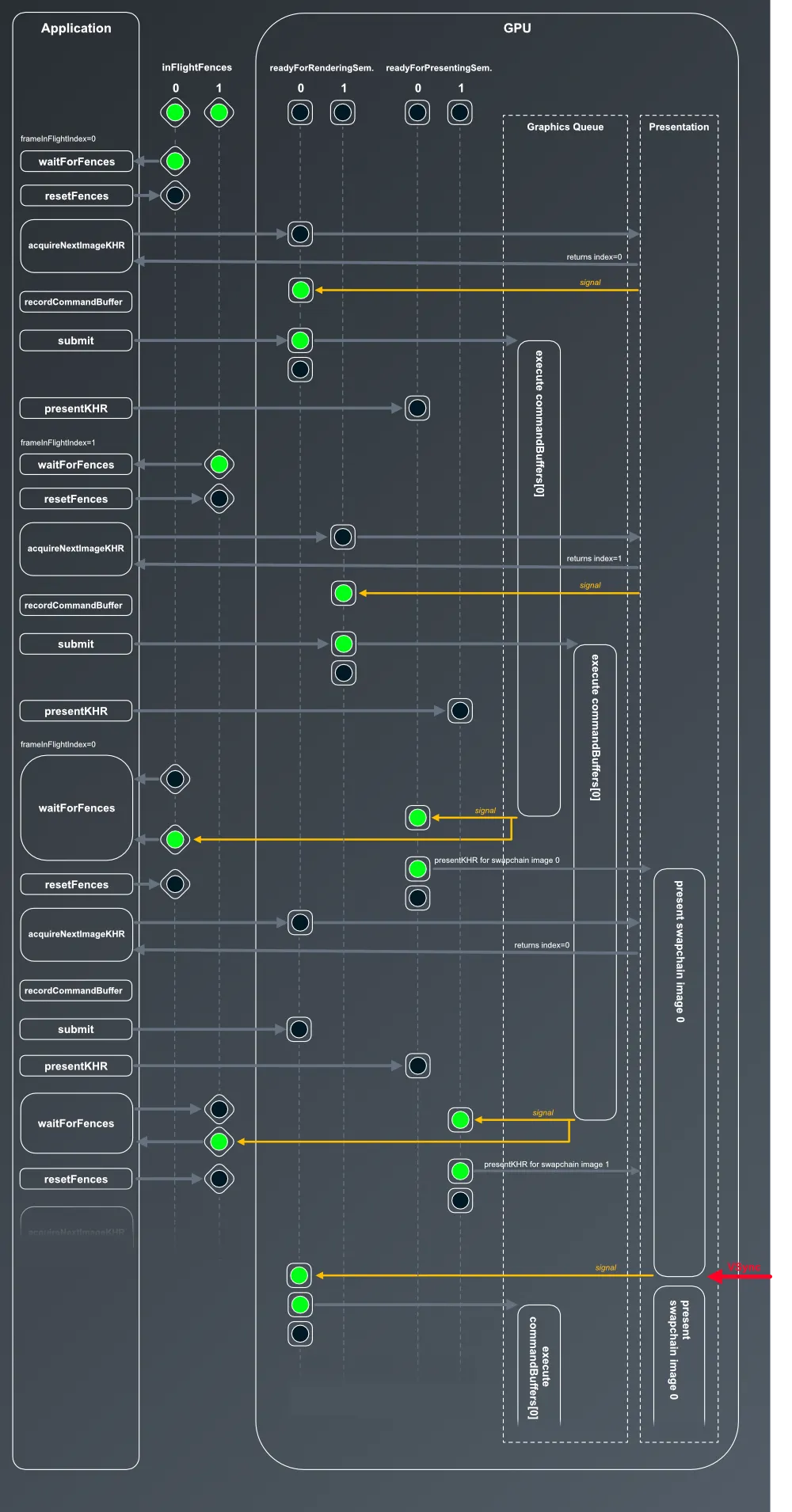
- We start with
frameInFlightIndex=0. - The first call in our rendering loop is
waitForFences. Since we created the fences in a signaled state, this doesn’t wait but immediately proceeds to theresetFences, which resets theinFlightFences[0]to an unsignaled state. - next, we call
acquireNextImageKHRwithreadyForRenderingSemaphores[0], which has been created in an unsignaled state. We didn’t use any of the swapchain images yet, so the call immediately signals the semaphore and returns index 0 - next we record the command buffers. As said above, recording in itself is safe because we’re not actually accessing any of the resources. We only use references to the command- and framebuffers here.
- then we
submitthe command buffer. Because we passreadyForRenderingSemaphores[0]as the wait semaphore, the GPU would wait before the color attachment stage until it is signaled. This has already happened here, so the semaphore is reset3 and the commands incommandBuffers[0]start executing right away. - importantly, execution of the main program doesn’t stop to wait for the command buffer to be processed, instead it moves on directly to the call to
presentKHR. However, since we passreadyForPresentingSemaphores[0]as a wait semaphore here, and that one is not yet signalled, nothing happens just now. The call returns and the main program can continue execution. - this whole sequence repeats for
frameInFlightIndex=1 - and now it gets interesting:
frameInFlightIndexwraps around to 0, butcommandBuffer[0]is still being executed. Which means that also the semaphores andframebufferfor index 0 are still in use. If we didn’t have synchronization, we’d run into exactly the error we’ve seen at the beginning of this lesson. We do have the fences now though, and becauseinFlightFences[0]isn’t signalled yet, program execution ofmain()halts atwaitForFences. - eventually, the GPU finishes executing
commandBuffers[0]and signals both,readyForPresentingSemaphores[0]andinFlightFences[0] - signalling
readyForPresentingSemaphore[0]unlocks the previously blocked call topresentKHRfor swapchain image 0, so that frame is now being presented while the semaphore is being reset - signalling
inFlightFences[0]also unlocks the blockedwaitForFencescall and the main program resumes execution. Note that because the fence was signalled when the command buffer execution was completed, that implicitly also signalled the availability of the respective framebuffer and rendering semaphore, so re-using them is fine from now on. First we reset the fence though. - then we call
acquireNextImageKHRwithreadyForRenderingSemaphores[0]again. The semaphore is unsignalled, so the call is fine. However, the image in question is still being presented, we can’t use it. That’s why the semaphore doesn’t get signalled immediately. The function call returns however and execution of main continues. - recording the command buffer is fine, but since
readyForRenderingSemaphores[0]is not yet signalled, the call to submit will not result in any immediate execution4. Instead the function will return, but GPU execution will wait for the semaphore to be signalled. - the subsequent call to
presentKHRwill not yield any immediate effect either,readyForPresentingSemaphores[0]is not signalled. - the
mainfunction will now wrap around again, setframeInFlightIndexto 1 and wait for the fence to be signalled again - eventually, presentation of swapchain image 0 will be finished when receiving the VSYNC signal and image 1 will be presented instead. Finishing presentation of image 0 will in turn cause
readyForRenderingSemaphores[0]to be signalled, which then will unlock the blockedsubmitexecution.
… and so on.
Finishing Up
Section titled “Finishing Up”Now everything works fine - until you close the application. At that point you get several validation errors again, all complaining about destroying something that is in use. What causes them is the fact that when we exit the render loop we also reach the end of our try block. All of the Unique... objects that we created are thus being cleaned up while there’s still at least one command buffer being executed on the GPU.
To fix that we make use of waitIdle again. This time the blunt tool is actually appropriate: we are exiting the application, so we no longer care about losing rendering performance or blocking our host application for a few milliseconds. Anything more sophisticated than that would add unnecessary complexity.
...try{    ...    while ( !glfwWindowShouldClose( window.get() ) )    {        ...    }
    logicalDevice->waitIdle();}...
With that in place the validation errors on exit should be gone as well.
And that’s finally it for today. It’s been quite a bit of work, but we’ve made our pipeline much more robust already.
Footnotes
Section titled “Footnotes”-
There’s a third type of synchronization primitive: events. They are used in more advanced cases, so we’re not going to talk about them here. ↩
-
You might be tempted to reuse the same semaphore as for acquiring the image. After all that one will be reset once the rendering starts, so it should be fine to use it to signal render completion. The problem is that the order of operations is not guaranteed, and Vulkan requires that the wait is already queued when the signal happens. Concretely, if
submitis still waiting on the semaphore (because the image hasn’t been acquired yet) the host may already have issued thepresentKHRcall by the time it gets signaled. Both calls would then be waiting on the same semaphore and resume together, effectively synchronizing rendering and presentation to start at the same time. ↩ -
Semaphores reset automatically once a wait is satisfied, there is no explicit resetting happening ↩
-
Actually, since we set the wait stage (via
setWaitDstStageMask) toeColorAttachmentOutput, the command buffer might start executing until it reaches the point where it’d have to access the color attachment. I made this simplification for better readability, and it doesn’t change the general flow. ↩