Lesson 7: Shaders
Shaders are small programs that are executed on the GPU hardware, usually a lot of them in parallel. Vulkan and OpenGL shaders are commonly written in a language called GLSL (GL Shading Language)1, which is very similar to C. The shaders are compiled and uploaded to the graphics hardware every time the Vulkan application runs. There are multiple types of shaders that allow you to customize the graphics pipeline at different points, e.g. vertex-, fragment- or geometry shaders. For our compute pipeline however there is only one relevant type, which is the compute shader.
GLSL basics
Section titled “GLSL basics”The most basic shader we can write in GLSL looks something like this:
#version 450
void main(){
}
To C and C++ programmers this looks pretty familiar, right? The first line, starting with a hash, is indeed called a preprocessor directive just like in C and C++. Every shader should start with this version identifier that denotes the GLSL language version the shader is written in. This allows the compiler to process the code in the best possible way and do detailed checks according to the denoted version.
Most of the other preprocessor directives will be intuitive for C and C++ programmers: #define, #undef, #ifdef, #pragma, #error etc. There are also a few that are specific to GLSL, like #version, but ultimately there’s nothing new here.
The main function is slightly different compared to its C/C++ counterparts in that it doesn’t have a return value. Shaders do not return values. But otherwise functions are declared and used in the same way as in C/C++.
Compiling the shader
Section titled “Compiling the shader”Another difference between Vulkan and OpenGL is that Vulkan requires us to precompile the shaders. In OpenGL the GLSL code is loaded by the application and then compiled and linked into a program explicitly. Since all of that happens at runtime, the respective driver on the user’s device needs to do all the required heavy lifting. This makes OpenGL drivers even more complex than they need to be anyway and may lead to subtle differences in behaviour or even bugs because of the different compiler implementations.
In Vulkan, the GLSL code has to be precompiled into an intermediate binary representation called SPIR-V before loading it into the application and handing it over to the runtime. So instead of raw GLSL the shaders are shipped with the application as SPIR-V bytecode. Compiling SPIR-V to the native binary code for the GPU is much less complex, the drivers can thus be simpler and the potential for bugs and divergences is reduced quite significantly.
The GLSL to SPIR-V compiler that comes with the Vulkan SDK is located in its bin folder and is called glslc. Its basic usage is very straightforward:
> glslc <glsl_shader_filename> -o <compiled_shader_filename>So let’s compile our minimal shader from above. Create a folder shaders in the src directory. In that folder create a text file named compute.comp2 and paste the above code into the file. Then create a folder shaders inside your build configuration output directory (e.g. build/bin/Debug/) and finally run this command3:
> glslc src/shaders/compute.comp -o build/bin/Debug/shaders/compute.comp.spvThat command should terminate without any output (indicating success) and you now should see the file compute.comp.spv4 in your build output’s shaders folder.
Nice, we now have the shader code in a format that can be used by Vulkan. However, I don’t want to manually repeat the compilation whenever I change the shader code, so let’s instead add it as a build step to our CMakeLists.txt.
First, let’s define two convenience variables for the shader source and output locations so we don’t have to repeat the paths:
set( SHADER_SOURCE_DIR "${CMAKE_CURRENT_SOURCE_DIR}/shaders" )set( SHADER_BINARY_DIR "${CMAKE_RUNTIME_OUTPUT_DIRECTORY}/$<CONFIG>/shaders" )For this to work, we need to set CMAKE_RUNTIME_OUTPUT_DIRECTORY in our CMakePresets.json5:
{ ... "configurePresets": [ { "name": "base", "hidden": true, "binaryDir": "${sourceDir}/build/${presetName}", "toolchainFile": "$env{VCPKG_ROOT}/scripts/buildsystems/vcpkg.cmake", "cacheVariables": { "CMAKE_RUNTIME_OUTPUT_DIRECTORY": "${sourceDir}/build/bin" } }, ... ]}With the convenience variables in place, we can now define a custom command for the shader compilation:
add_custom_command( OUTPUT "${SHADER_BINARY_DIR}/compute.comp.spv" COMMAND ${CMAKE_COMMAND} -E make_directory "${SHADER_BINARY_DIR}" COMMAND ${Vulkan_GLSLC_EXECUTABLE} "${SHADER_SOURCE_DIR}/compute.comp" -o "${SHADER_BINARY_DIR}/compute.comp.spv" DEPENDS "${SHADER_SOURCE_DIR}/compute.comp" COMMENT "Compiling compute shader" VERBATIM)The OUTPUT clause tells CMake what file this command produces. CMake uses this to compare timestamps: if compute.comp.spv is newer than compute.comp, the shader is not recompiled. The DEPENDS clause names the source file to compare against.
The first COMMAND creates the output directory at build time if it doesn’t exist yet, and the second runs the actual compilation. ${Vulkan_GLSLC_EXECUTABLE} is a CMake variable that is populated by find_package( Vulkan REQUIRED COMPONENTS glslc ) with the full path to the glslc compiler that ships with the Vulkan SDK. Requesting the glslc component makes the configure step fail early with a clear message if the compiler is missing, instead of producing a confusing error later at build time.
add_custom_command on its own only defines the command; it runs only when another target actually consumes its OUTPUT. As things stand nothing does, so CMake would never execute it. We therefore create a custom target that depends on the output file and make it a dependency of our main target.
add_custom_target( shaders DEPENDS "${SHADER_BINARY_DIR}/compute.comp.spv" )add_dependencies( ${TARGET_NAME} shaders )Now the shader will be compiled on the first build and recompiled only when compute.comp changes.
Loading the shader
Section titled “Loading the shader”Okay, we have the precompiled shader now. The next step is to load it into the application and pass it on to Vulkan. The Vulkan C++ representation of a shader is vk::ShaderModule and it is created like this:
class Device{ ... UniqueShaderModule createShaderModuleUnique( const ShaderModuleCreateInfo& createInfo, ... ); ...};No surprises so far, let’s look at ShaderModuleCreateInfo:
struct ShaderModuleCreateInfo{ ... ShaderModuleCreateInfo& setFlags( vk::ShaderModuleCreateFlags ); ShaderModuleCreateInfo& setCode( const container_t< const std::uint32_t >& ); ...};As so often, the flags are just there for future use, which means that we really only have one parameter to set - the shader code in the form of a 32bit uint buffer. Which means that the whole process of creating the ShaderModule is very straightforward:
auto createShaderModule(    const vk::Device& logicalDevice,    const std::filesystem::path& path) -> vk::UniqueShaderModule{    std::ifstream is{ path, std::ios::binary };    if ( !is.is_open() )        throw std::runtime_error( "Could not open file" );
    auto buffer = std::vector< std::uint32_t >{};    const auto bufferSizeInBytes = std::filesystem::file_size( path );    if ( bufferSizeInBytes % sizeof( std::uint32_t ) != 0 )        throw std::runtime_error( "Shader file size is not a multiple of 4 bytes" );    buffer.resize( bufferSizeInBytes / sizeof( std::uint32_t ) );
    is.seekg( 0 );    is.read( reinterpret_cast< char* >( buffer.data() ), bufferSizeInBytes );
    const auto createInfo = vk::ShaderModuleCreateInfo{}.setCode( buffer );    return logicalDevice.createShaderModuleUnique( createInfo );}
The only thing we need to pay a bit of attention to is the mismatch between what the standard library expects when reading data (a pointer to a byte buffer) and what Vulkan expects (a uint32_t buffer). I’ve packaged the shader module creation into its own function from the start because it makes the code in main clearer and we’re definitely going to need it more often in the future when we get to the graphics shaders. So with that we can load our compiled compute shader:
const auto computeShader = createShaderModule( *logicalDevice, "./shaders/compute.comp.spv" );Extending the shader code
Section titled “Extending the shader code”The shader we have so far is obviously not useful for anything. Let’s change that. Let’s assume our goal is to multiply each input element by 4.2, which is still not particularly useful, but at least we could demonstrate that the pipeline works and the values are computed. So what we want to do is something like this:
void main(){ outputBuffer = inputBuffer * 4.2; // does not compile}That won’t work of course. If you try to compile the shader in that state, glslc will complain that neither outputBuffer nor inputBuffer are declared. Ultimately we want the buffers to be the GPU buffers we created in the last lesson. But since we don’t know how to do that yet, let’s create some dummy buffers directly in the shader6:
const uint BUFFER_SIZE = 500;  // must match numElements in main.cpp
int inputBuffer[BUFFER_SIZE];float outputBuffer[BUFFER_SIZE];
That solves the issue with the undeclared variables, but now we have a new problem. Just like in C++ it is not possible to just multiply a buffer by a factor. And even if it were possible - the whole point of our compute pipeline is to parallelize the calculation by running the shader many times in parallel. So we don’t want the shader code to process the whole buffer, we want each shader instance to only process one element in that buffer. Something along these lines:
void main(){ outputBuffer[processingIndex] = inputBuffer[processingIndex] * 4.2;}So we need this processingIndex, i.e. the index of the data element that the specific shader invocation is supposed to process. To be able to set this in a meaningful way, we have to take a quick detour and look into how graphics hardware is organized and how Vulkan models compute shader invocations to make use of that hardware.
As mentioned before in this tutorial, GPUs have thousands of small general purpose processing cores. They are much simpler than the cores in a modern CPU, but because they are so many they can do parallel computations on big datasets really fast. Those small cores are grouped into larger processing units which share registers, caches, scheduler etc and can run multiple batches of work in a hyperthreaded way.
The two main concepts in Vulkan to organize this massive parallelization are the so-called local and global workgroups. Local workgroups are defined in the shader code itself and thus cannot be modified at runtime. A local workgroup essentially defines how many instances of the shader are to be executed simultaneously. In the simplest case the workgroup size is just a one-dimensional number, but Vulkan also allows you to specify two- and three-dimensional workgroups.7
Global workgroups (aka Dispatches) on the other hand are created by the host application at runtime. A global workgroup defines how many local workgroups are to be run in parallel. You might wonder why that differentiation was made instead of just having one type of workgroup that directly specifies the number of parallel computations. The reason is that this two-level hierarchy is much better tailored to the architecture of the GPUs, as the driver can better distribute the local workgroups to the available processing units. In addition, the shader invocations in one local workgroup can access workgroup-local memory and share state and data (something we won’t go into further detail here).
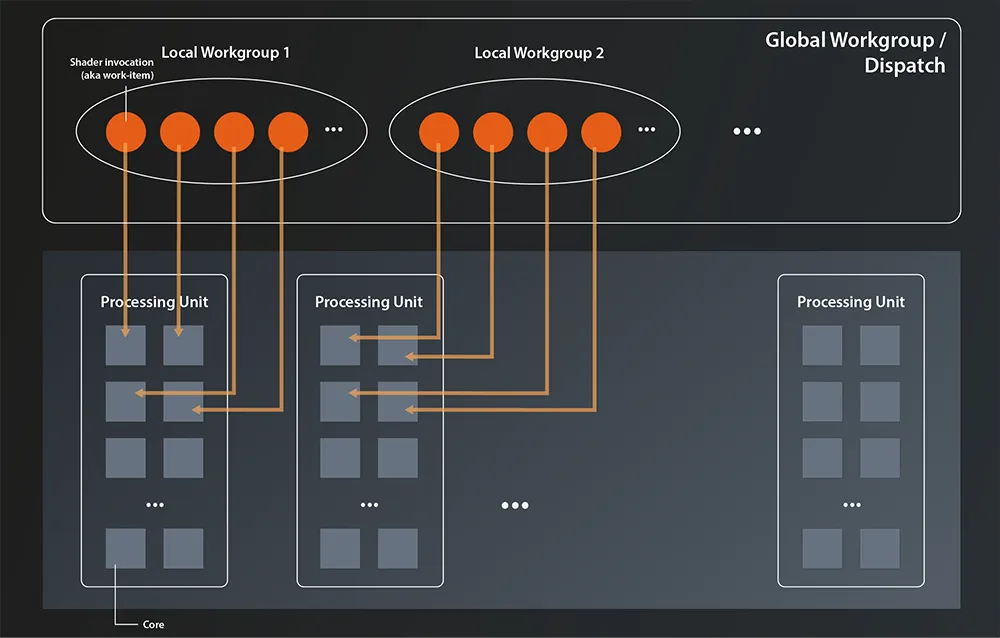
We’ll talk more about dispatching the global workgroups in a later lesson. For now let’s focus on the local workgroups. As said, those are defined in the shader code by specifying the workgroup layout:
layout( local_size_x = 8, local_size_y = 8, local_size_z = 4 ) in;This is an example of a three-dimensional local workgroup. In our current usecase the multiple dimensions don’t really add any value, so we can go with a one-dimensional one:
layout( local_size_x = 64 ) in;As you can see, you can omit the y and z dimension if it’s 1. Note that we’re setting the workgroup size to be smaller than the number of elements in our buffer. It is a recommended best practice to keep local workgroups relatively small (<=64) so that they can fit into one processing unit. That means of course that we’ll have to issue eight of them in our dispatch from the application to process all our data8.
Now that we have the workgroup size defined, specifying the correct index into our data is actually very straightforward, as GLSL provides the builtin variables gl_WorkGroupID, gl_WorkGroupSize and gl_LocalInvocationID:
void main(){    uint processingIndex = gl_WorkGroupID.x * gl_WorkGroupSize.x + gl_LocalInvocationID.x;    if ( processingIndex >= BUFFER_SIZE )        return;
    outputBuffer[processingIndex] = inputBuffer[processingIndex] * 4.2;}
gl_WorkGroupID is the index of the current workgroup in the dispatch and gl_LocalInvocationID is the index of the shader invocation within this workgroup. The size of a local workgroup can be obtained with gl_WorkGroupSize. All three variables are 3-dimensional vectors, just as the workgroup can be 3-dimensional. So obviously we’d need to also take the y and z values into account if our workgroups had more than one dimension.
Since computing the global index from these three variables is such a common operation, GLSL also provides the builtin gl_GlobalInvocationID which is exactly gl_WorkGroupID * gl_WorkGroupSize + gl_LocalInvocationID. Using it we can simplify our shader:
void main(){    uint processingIndex = gl_GlobalInvocationID.x;    if ( processingIndex >= BUFFER_SIZE )        return;
    outputBuffer[processingIndex] = inputBuffer[processingIndex] * 4.2;}
The bounds check is there to guard against out-of-bounds access: the number of shader invocations is determined by the dispatch size and workgroup size, which are typically rounded up to multiples of the local workgroup size. Without the guard, invocations whose index falls beyond the buffer size would access memory past the end of the array.
So far so good. Our shader is still not doing anything useful, because it isn’t connected to actual input and output buffers yet. Before we can modify it accordingly though we need to understand a bit more about how the compute pipeline works. We’ll therefore leave it as is for the moment and start working on the pipeline next time.
Further reading:
Compute shaders and workgroups (Stack Overflow)
Footnotes
Section titled “Footnotes”-
The GLSL Vulkan profile differs slightly from the one for OpenGL, mostly in that it removes deprecations. Some OpenGL shaders therefore might not compile directly for Vulkan without modifications. However, those modifications should usually be pretty minor. ↩
-
There is no official standard that specifies the extension of .glsl shaders. However, the extensions
.vert,.fragand.compare very common for vertex, fragment and compute shaders respectively. They are also recognized by most tools that work with GLSL (e.g. VS code extensions). ↩ -
Installing the Vulkan SDK should have put its
bindirectory in your path so that the executable is found automatically. If that is not the case you should add that directory to your path by hand and try again. ↩ -
The output file name
compute.comp.spvmay seem unnecessarily repetitive. This is true in our case, where we only have one compute shader. In larger projects however, you might have multiple vertex-, fragment- and compute-shaders. In that case, adding the shader type to the output filename helps avoid collisions and avoid confusion. ↩ -
For the created program binaries,
CMAKE_RUNTIME_OUTPUT_DIRECTORY_DEBUGandCMAKE_RUNTIME_OUTPUT_DIRECTORY_RELEASEtake precedence overCMAKE_RUNTIME_OUTPUT_DIRECTORY. They ensure that our setup works with both single-config generators (e.g. Ninja) and multi-config generators (e.g. Visual Studio). If we wanted to use those variables for the compiled shaders as well, however, we’d have to add a conditional in the cmake code, so I opted for this approach. ↩ -
You’ll probably notice an issue here: we have to declare the same logical variable (the buffer size) in two places: in the C++ and the shader code. This is error prone and should be fixed. The idiomatic way to do that in Vulkan would be to communicate the buffer size from C++ to the shader using either specialization constants or push constants. We won’t do that here to not add even more complexity, but you should be aware of this problem and its solutions. ↩
-
To my knowledge this is pure convenience for when you have to deal with two- and three-dimensional datasets (plus maybe a bit of heritage from graphics programming). I.e. there is no practical difference on the hardware between a one-dimensional workgroup with 256 parallel invocations, and a three-dimensional one with a size of 8x8x4. ↩
-
In case you want to set a bigger workgroup size, be sure to check the value of vk::PhysicalDeviceProperties::limits.maxComputeWorkGroupInvocations (see lesson 3). That tells you the maximum number of parallel invocations in a local workgroup the device supports. ↩